Boat and Yacht Booking System
Boat and Yacht Charter Booking System for WordPress
Created: 01.12.2020 | Latest update: 17.08.2022
About
Boat and Yacht Charter Booking System is a powerful watercraft reservation WordPress plugin for companies of all sizes. The system will work both in a small water equipment rental business, e.g. a rental of rowing boats, kayaks, pedal boats, as well as the main booking system for servicing a large water port or marina. The plugin will handle a large number of vessels and allows you to handle unlimited locations.
It provides a simple, step-by-step booking process with online payments, e-mail and sms notifications, WooCommerce and Google Calendar integration and an intuitive backend administration.
Backend Features
Bookings
Displays a list of all submitted orders (bookings) in the system.
- Browse, edit or delete submitted bookings.
- Quick preview on: booking name, status, place of departure and return, rental period, boat, client, order price, date of booking.
- Set statuses for bookings: New, Accepted, Rejected, Finished.
- Detailed info about: status, departure date and time, departure location, return date and time, return location, order total amount.
- Detailed billing info: id, ordered item name and unit, quantity, net unit price, net value, tax rate, total gross amount.
- Detailed watercraft info: boat name, boat prices including initial fee, rental per day fee, rental per hour fee, deposit, one way fee, departure after business hours fee, return after business hours fee.
- Ordered extras list: ordered item name, quantity, net unit price, net value, tax rate, total gross amount.
- Detailed client info: client first and last name, e-mail address, phone number, client comment, billing address.
- Selected payment method.
Booking Forms
With this module you can create unlimited number of booking forms and for each of the forms define different settings.
- Define default booking status for new order.
- Enable or disable geolocation.
- Enable or disable WooCommerce support.
- Set default sorting option for boats.
- Assign supported marinas.
- Select default departure marina (optional).
- Select default return marina (optional).
- Turn on/off the ability to choose a marina by the customer.
- Set currencies.
- Enable or disable coupons.
- Enable or disable minimum order value to send the booking.
- Decide whether to openly show any additional fees or hide them (will be added to the total price).
- Enable or disable net prices.
- Show or hide 'sail' form field in the first booking step.
- Set the default value of the 'sail' form field.
- Show or hide departure/return 'time' form field in the first booking step.
- Set timepicker interval in minutes.
- Show or hide by default or set as mandatory billing address form fields.
- Customize 'Back to home' button on the 'Thank you' page.
- Enable or disable boat counters.
- Enable or disable sticky summary sidebar.
- Enable or disable boats filtering.
- Enable or disable scroll to extra options after choosing a boat.
- Select which form fields should be marked as mandatory.
- Enable or disable form preloader.
- Enable or disable top navigation bar.
- Enable or disable boat attributes visibility.
- Add custom form fields to the booking form.
- Add custom agreements form fields needed to be accepted by the client prior making a booking.
- Set plugin color scheme with bulid-in color picker.
- Enable or disable google map.
- Enable or disable dragging on the map.
- Enable or disable scroll wheel on the map.
- Set google map look and feel.
- Set google map zoom level.
- Style google map in JSON format.
Booking Extras
A module that allows you to add unlimited number of add-ons which can then be selected by the customer like skipper, outboard engine or additional cruise related services.
- Browse, add, edit or delete booking extras.
- Quick preview on: booking extras name, price, published date.
- Add add-on description.
- Define add-on quantity (minimum, default, maximum).
- Set add-on quantity equal to number of rental days.
- Block the possibility of changing the number of selected add-ons.
- Set add-on toggle button default state (not selected, selected, mandatory).
- Set add-on unit price.
- Set add-on tax rate.
- Set add-on price type: price per entire rental period x quantity or price per single day x quantity.
- Assing boats for which this add-on applies (optional).
- Assing boats for which this add-on has a different price (optional).
Boats
With this module you can define unlimited number of watercrafts (or boats) and set a number of parameters for them.
- Browse, add, edit or delete boats.
- Quick preview on: item thumbnail, item title, number of guests and cabins, rental prices, published date.
- Set boat name and add description using the default WordPress editor.
- Set boat featured image.
- Select at least one marina at which the boat is available.
- Enter boat length to be displayed in the booking.
- Enter the number of guests the boat can accommodate.
- Enter the number of cabins the boat has.
- Define 'Group Code' to create a set of boats. Only one boat from the group with the same code will be displayed on booking form.
- Define whether the captain is mandatory, unavailable or optional for the boat.
- Set prices including: initial fee, rental per day fee, rental per hour fee, deposit, one way fee, departure after business hours fee, return after business hours fee.
- Assign and set boat attributes (see Attributes module).
- Set boat availability, exclude dates from the booking form.
Boat Types
A list of available watercrafts (or boats) types.
Boat Attributes
In this module you can define unlimited number of watercrafts (or boats) attributes and then you can assign them to single boats in their settings.
- Browse, add, edit or delete boats attributes.
- Quick preview on: attribute name, attribute type, published date.
- Select one of the three attribute types: Text Value, Single Choice, Multi Choice.
- A text value is used for any custom text. For example, you can define an attribute named 'color' and then specify it by entering it in a single boat settings.
- A single and multi choices are used for predefined values. For example, you can define an attribute named 'fuel type' with two values 'petrol' and 'diesel' and then specify one of them or both of them in a single boat settings.
Pricing Rules
An extensive module that allows you to create an unlimited number of pricing rules depending on selected forms, departure marinas, return marinas, selected boats, selected days of the week, selected dates or dates ranges, rental days number, rental hours number.
Marinas
A list of available locations (marinas).
- Browse, add, edit or delete locations (marinas).
- Quick preview on: item title, published date.
- Add information about the marina such as: total berths number, maximum boat length and draught supported.
- Set rental period during which a customer can rent a boat.
- Set minimum and maximum number of days that the boat can be rented (optional).
- Set minimum and maximum number of days that the boat can be rented depending on the date (optional).
- Set time in minutes between consecutive bookings (optional).
- Set countries available.
- Set default contry for billing address.
- Set default boat for location (optional).
- Select in which way (if at all) plugin has to check if the boat is available to book.
- Set is it possible to departure or return a boat after business hours.
- Add location address and contact details.
- Add location map coordinates.
- Add location business hours.
- Select one or more payment methods available.
- Enable or disable the necessity to choose a payment method by a client.
- Enable or disable payment processing.
- Set the default payment option (optional).
- Set logotypes for different payment methods.
- Define the settings for selected payment gateways (e.g. paypal or stripe).
- Set e-mail notification options.
- Set Nexmo/Vonage SMS notification options.
- Set Twilio SMS notification options.
- Set Telegram notofication options.
- Enable or disable google calendar integration.
Coupons
A module that allows you to create discount coupons for customers.
- Browse, add, edit or delete coupons.
- Quick preview on: coupon code, usage limit, percentage discount, fixed discount, active from (date), active to (date).
- Add new coupon code with a single click (automatically generated code).
- Set and view current usage limit for a coupon.
- Select boats for which coupon will be applied.
- Select boat categories for which coupon will be applied.
- Set the date a coupon is active from (optional).
- Set the date a coupon is active to (optional).
- Set percentage or fixed discount value.
- Set the discount based on number of rental days (optional).
Tax Rates
Define available tax rates like 0%, 8%, 23%.
E-mail Accounts
Define e-mail accounts for notifications.
Frontend Features
- Responsive Layout
- Retina Ready
- Ajax Driven
- Step Based Form with Easy Steps Navigation
- Google Maps integration
- WooCommerce Integration (the Plugin is Also Fully Functional without WooCommerce Installed)
- Integrated with Paypal, Stripe and WooCommerce Payment Gateways
- Support for Cash and Wire Transfer Payment Methods
- Google Calendar Integration
- SMS Integration with Nexmo and Twilio
- Telegram Messenger Integration
- WPBakery Page Builder for WordPress Integration
- Uses Geolocation
- Extensive Pricing Rules
- Custom Order Form Fields
- Custom Agreements
- Unlimited Booking Forms with Different Settings
- Unlimited Bookings
- Unlimited Watercrafts (Boats)
- Unlimited Add-Ons
- Detailed Documentation
- Demo Content Available with One Click Importer
- Fully Translatable with .po / .mo Files
- Valid HTML5 Code
- Crossbrowser Compatible
Installing the plugin

Installing the plugin via dashboard
To install the plugin via WordPress dashboard, please follow the steps below:
- Download the plugin (select Installable WordPress file only option) from the CodeCanyon to your computer. You will get file in ZIP format.
- Go to WordPress dashboard and navigate to Plugins / Add new.
- Click on Upload plugin button.
- Upload ZIP package from the first point.
- Click the Activate link that appears below the plugin's title.
Installing the plugin via FTP
To install the plugin via FTP, please follow the steps below:
- Download the plugin (select Installable WordPress file only option) from the CodeCanyon to your computer. You will get file in ZIP format.
- Unzip it to access the uncompressed files.
- Connect to your server using your preferred FTP application (e.g FileZilla).
- Navigate to the wp-content/plugins folder within the WordPress installation on your website.
- Upload uncompressed plugin to this location via FTP.
- Go to WordPress dashboard and click on Plugins menu.
- Click on Activate link.
- Now your plugin is installed and ready to work.
Updating the plugin
Please note:
- If you made any changes in plugin core files all of them will be lost.
- All data which you entered via WordPress dashboard will be untouched.
- In case of translations, please make copy of your .po and .mo file.
To update the plugin, please follow the steps below:
- Download the plugin (select Installable WordPress file only option) from the CodeCanyon to your computer. You will get file in ZIP format.
- Go to WordPress dashboard and navigate to Plugins.
- Find the plugin on the list.
- Deactivate old version.
- Remove old version.
- Click on Upload plugin button.
- Upload ZIP package from the first point.
- Click the Activate link that appears below the plugin's title.
- Reset browser cache before using the plugin.
Importing dummy content
To start importing demo content, please follow the steps below:
- Go to Settings / Boat Charter Booking System
- Click on Import demo tab.
- Click on Import button.
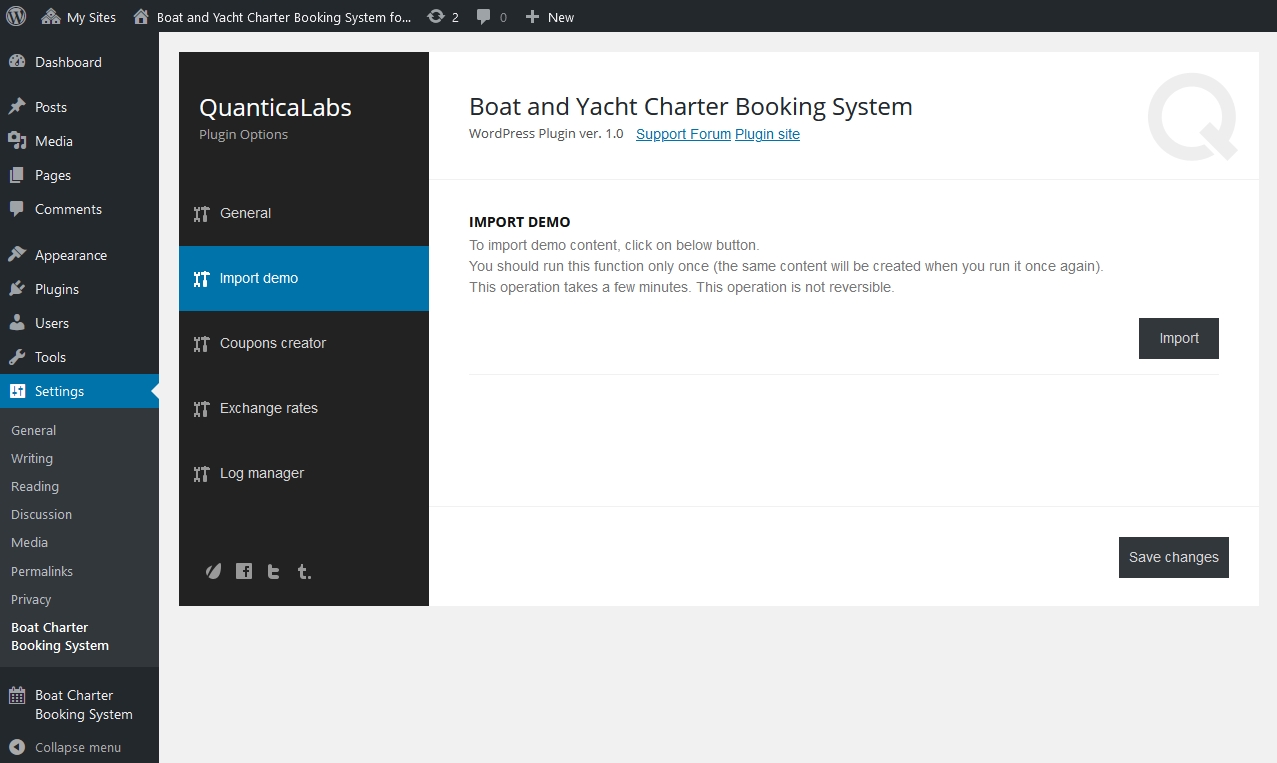
Please note that this operation is not reversible. It can takes a few seconds, depending on server speed.
Modules
Bookings
Bookings module allows to view orders sent by customers.
View Booking
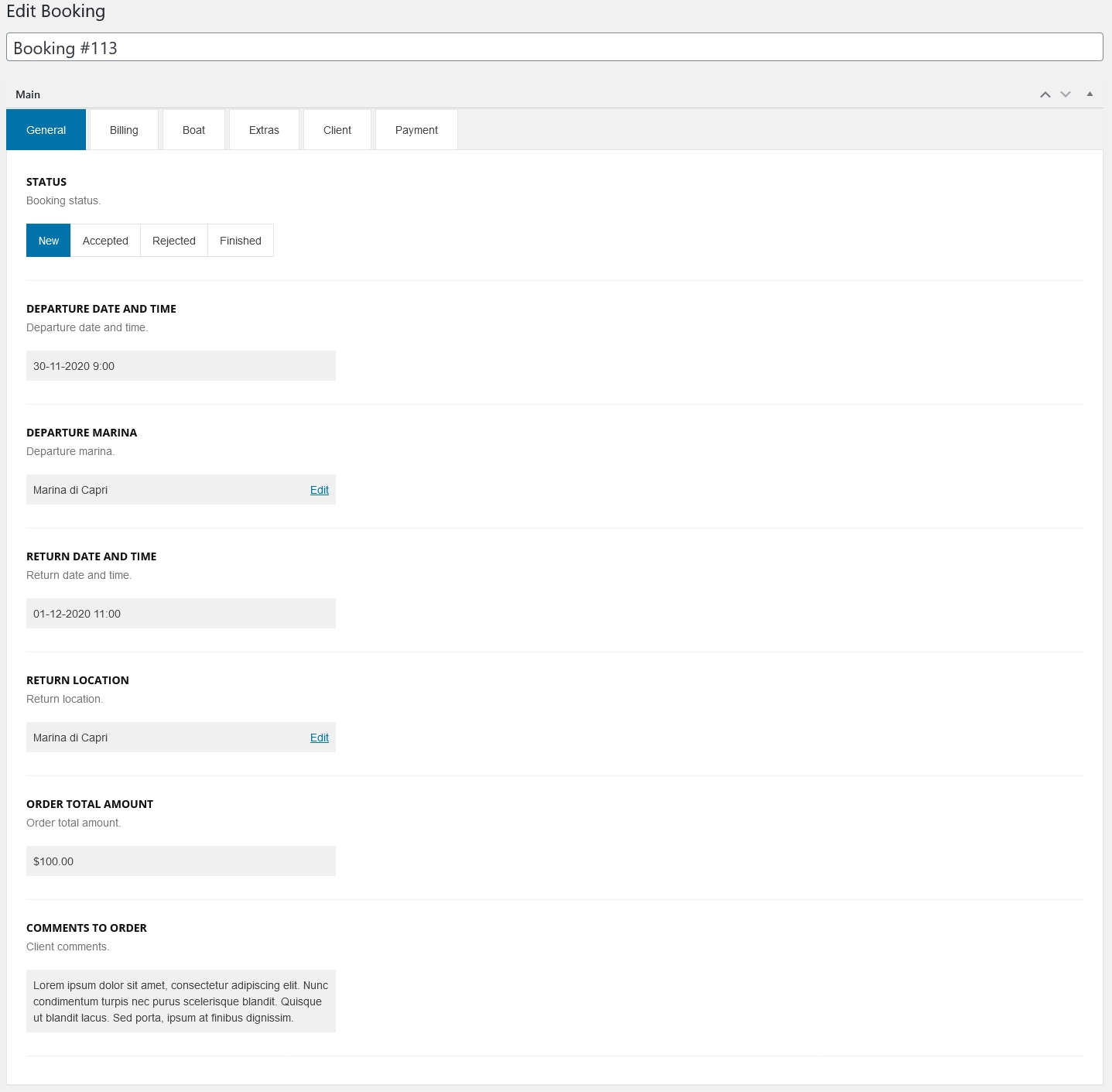
All booking details are organized in tabs:
- General - basic booking details like status, departure/return date and time etc.
- Billing - billing details,
- Boat - boat details name, prices etc.
- Extra - addons details,
- Client - client details like name, e-mail address, phone number, billing details etc.
- Payment - payment details like name, list of transactions etc.
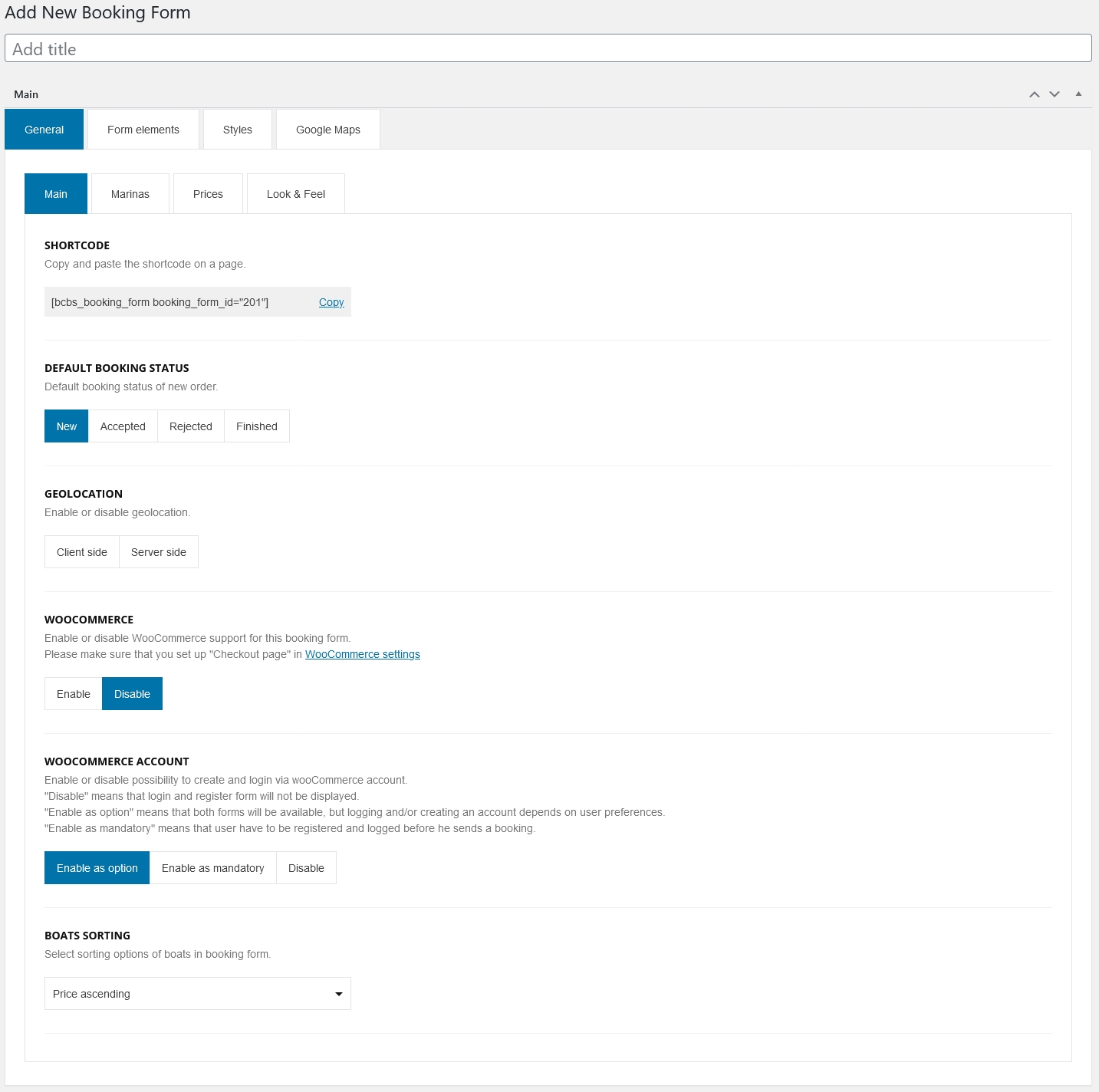
Booking Forms module allows to create complete booking form.
During adding/editing form you can set following details:
-
In General tab you can define basic details like: marinas, minimum order value etc.
-
In Form Eelements tab you can define your own, custom fields and list of agreements.
-
In Styles tab you can overwrite all colors used in booking form.
-
In Google Maps tab you can set up properties of map used in booking form.
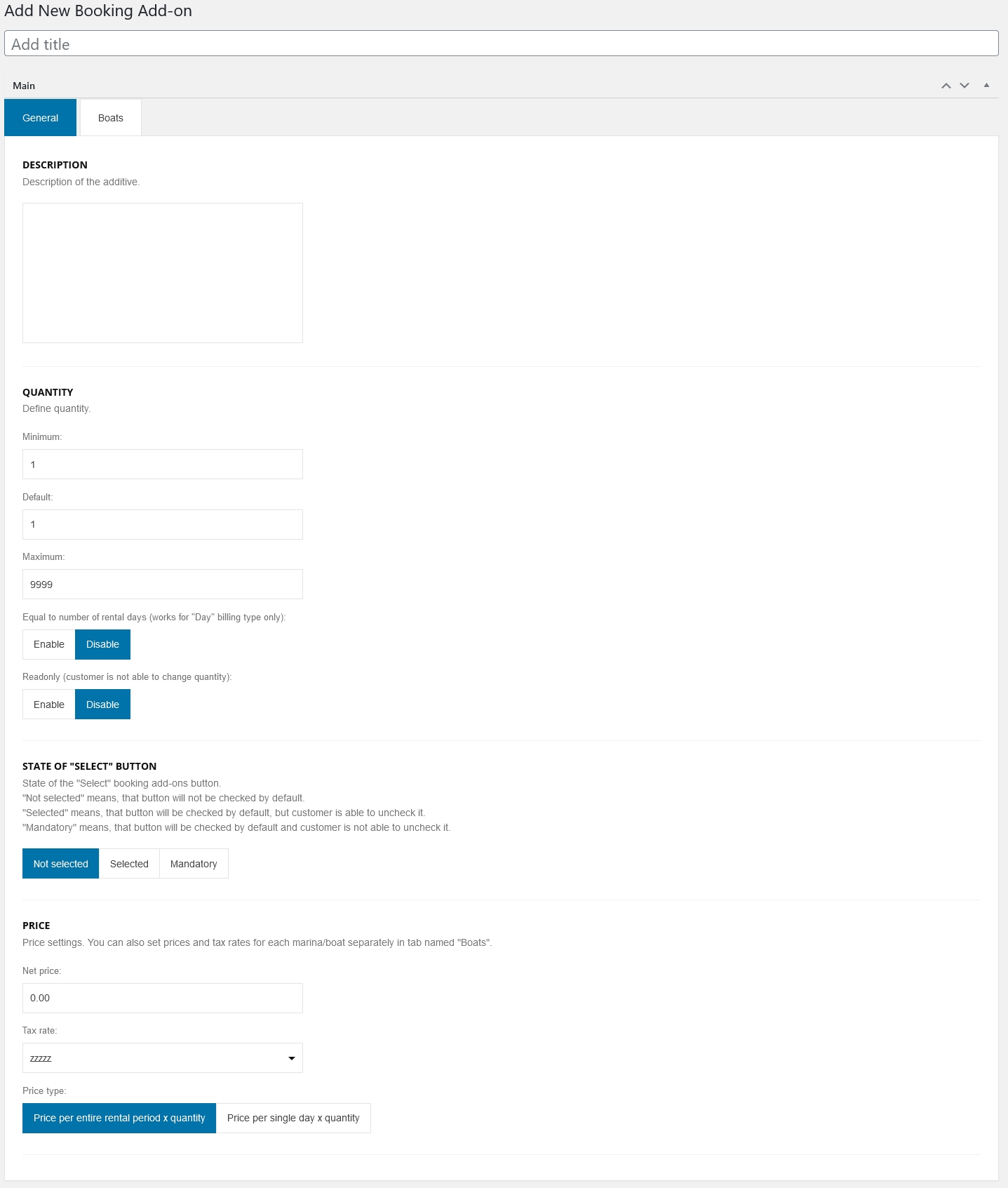
Booking Extras module is used to define booking addons.
During adding/editing extra you can set following details:
-
In General tab you can set all details like name, description, price value and type etc.
-
In Boats tab you can sef different prices/availibility depends on marina and boat.
Boats
Boats module is used to define boats available for customers.
Edit Boat
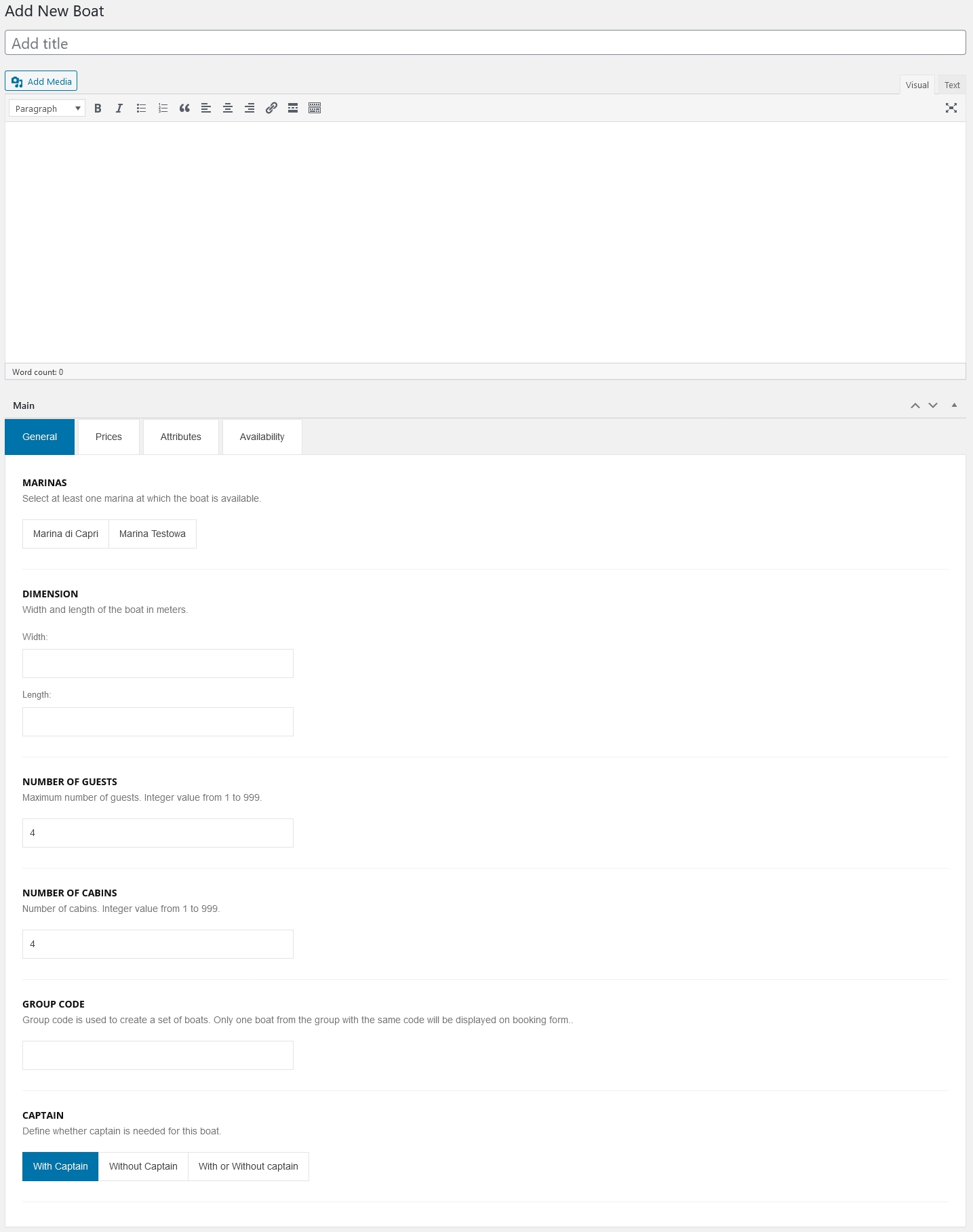
During adding/editing boat you can set following details:
-
In General you can basic detials like marinas, dimenions, number of guests/cabins etc.
-
In Prices you can set all type of boats prices and fees.
-
In Attributes tab you can enter (for text fields) or select (for lists) values for each boat attributes.
If you do not have to use some of them, simple leave it empty (for text attributes) or set value [Not set] (for attributes selected form list).
-
In Availability tab you can define availability of the boat.
Boat Types
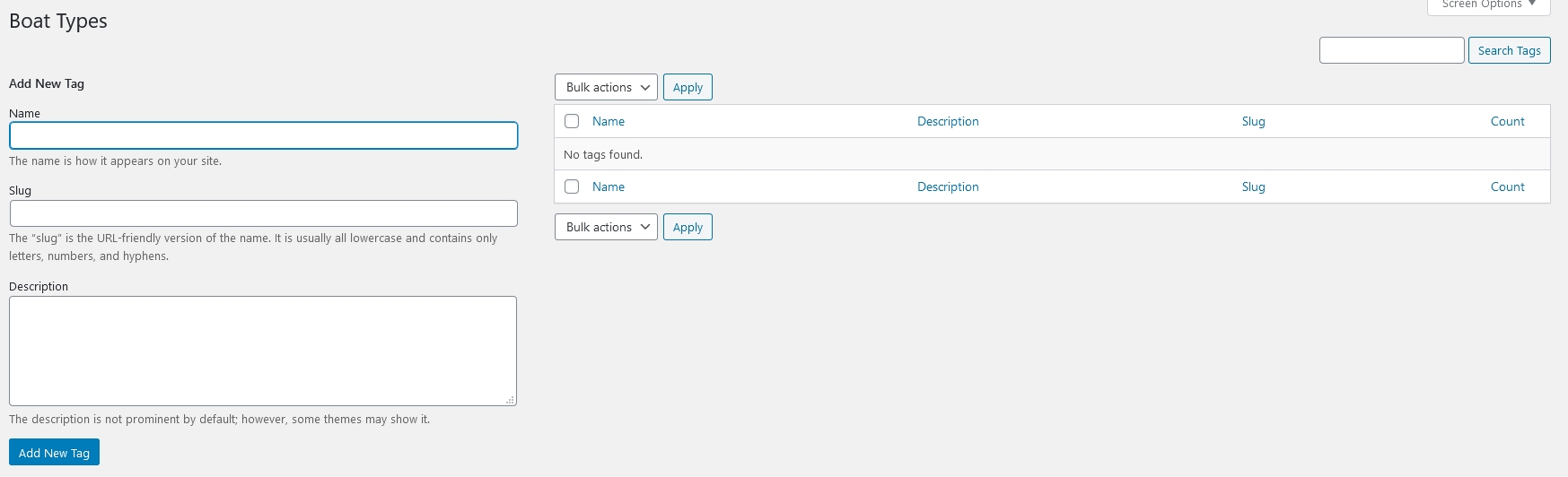
Boat Types module allows to define category of the boat. Managing of categories is the same as in case of posts.
Boat Attributes
Boat Attributes module allows to define dictionary of attributes (like engine, power, length etc.) which are selected/entered during adding/editing boat.
Edit Boat Attribute
During adding/editing attribute you can set following details:
-
In General tab:
- Type - type of attribute: text (value will be entered by user to the text field) or list (value(s) will be selected by user from defined set),
- Values - this option is available for list only. It includes set of possible values to select during adding/editing boat.
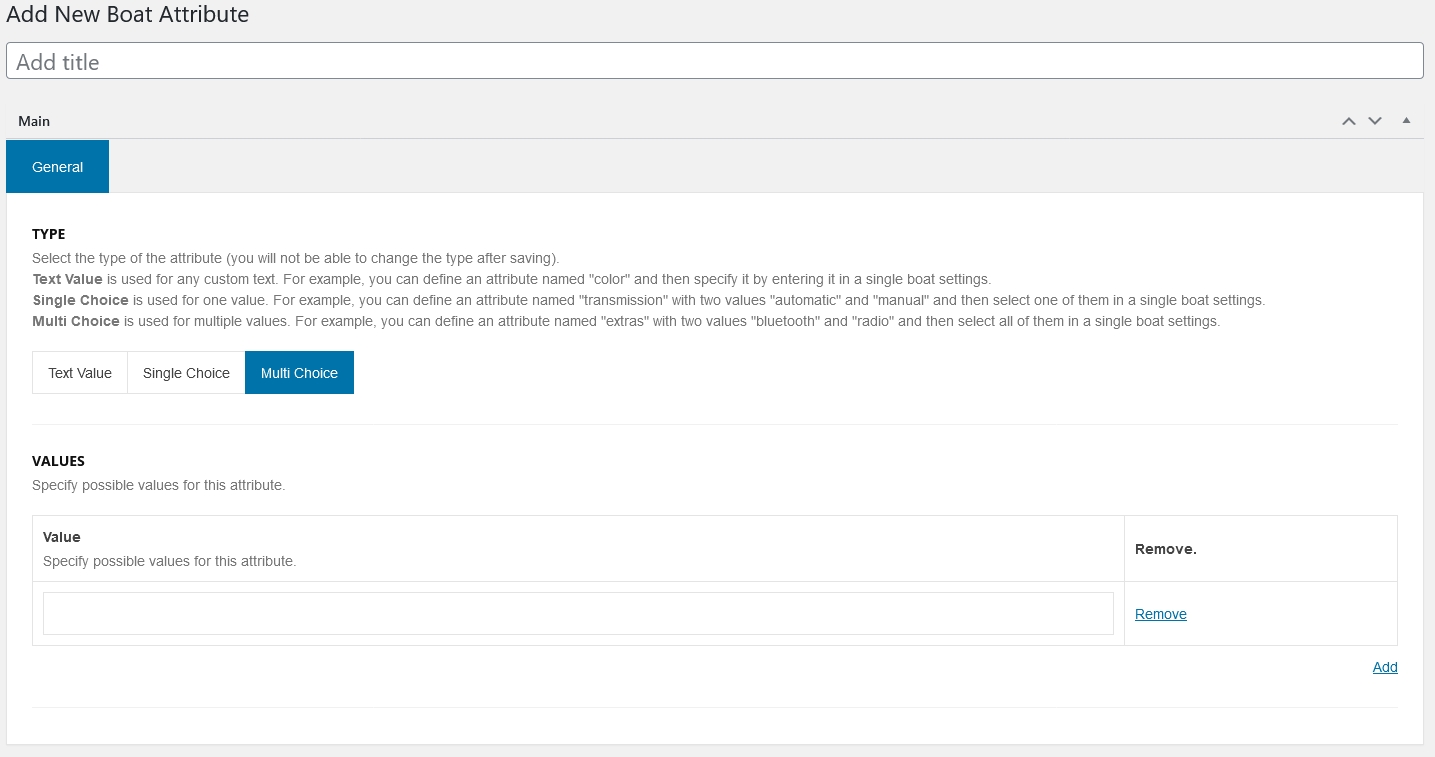
Please note, that changing attribute type is not allowed after its saving.
Pricing Rules
Pricing Rules module allows to define set of rules based on which you can change rental price.
Edit Pricing Rule
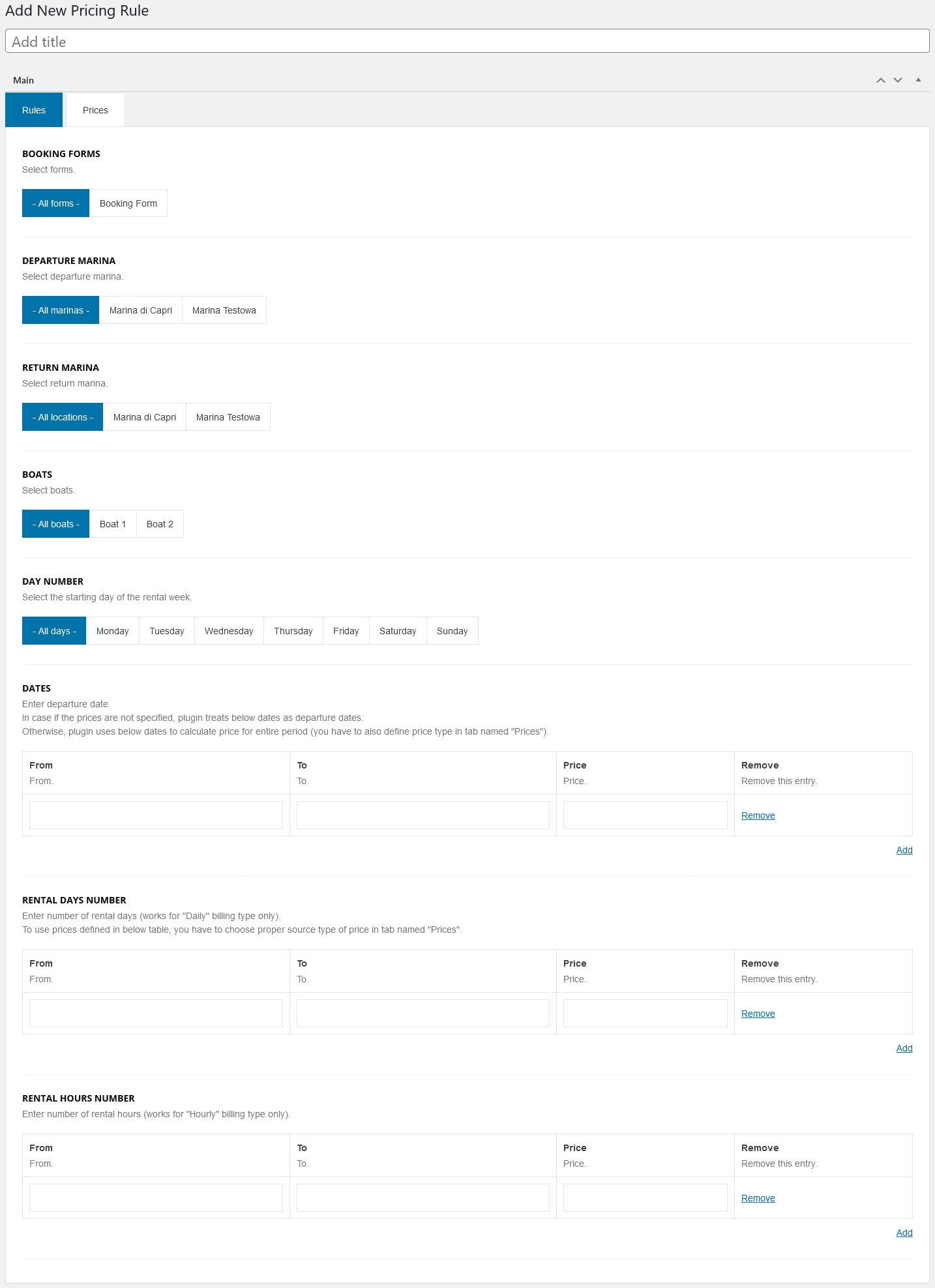
During adding/editing rule you can set following details:
-
In Rules tab you can define set of rules based on which price will be changed e.g: for a selected booking form, boat, day number, dates, rental period etc.
-
In Prices tab you can set modified price and tax rate.
Marinas
Locations module allows to define physical departments of company.
Edit Marina
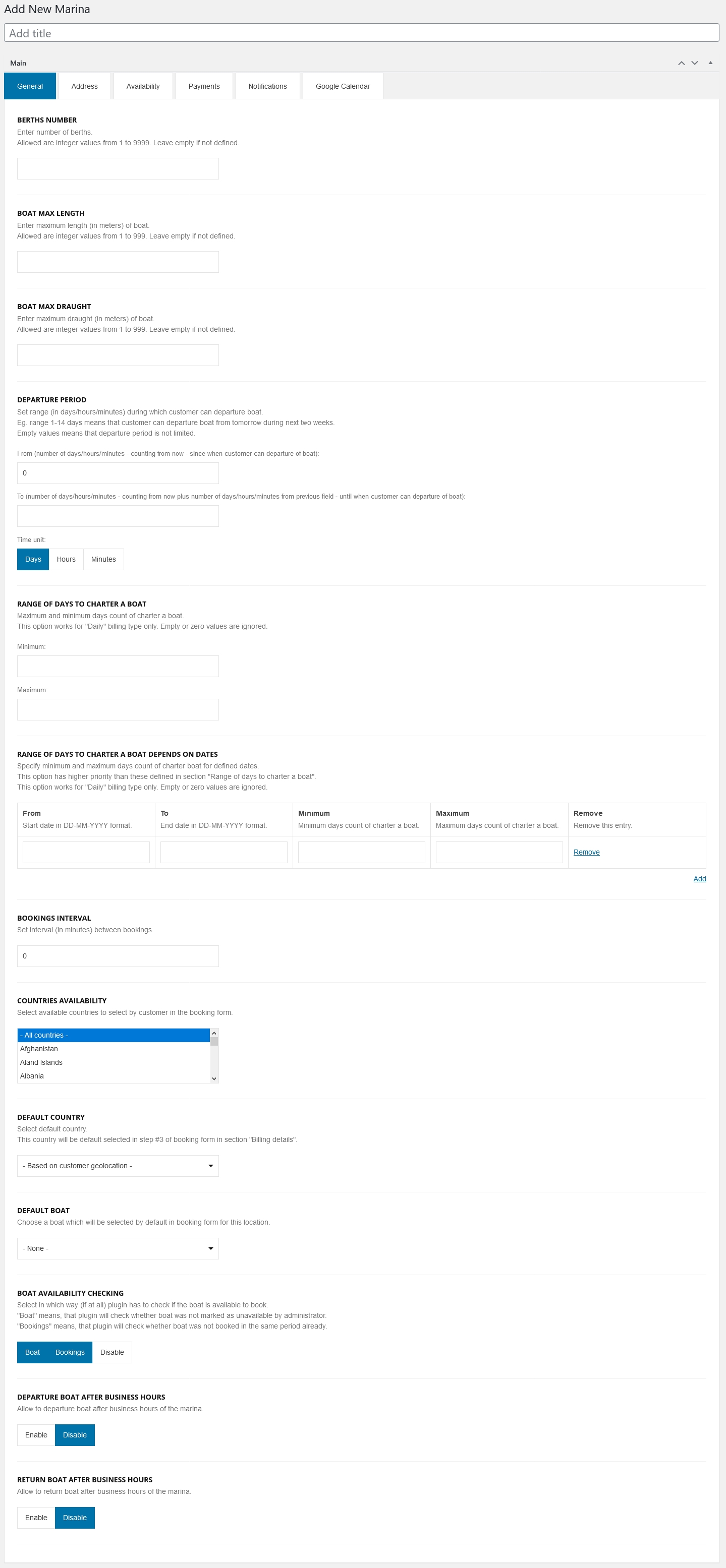
During adding/editing marina you can set following details:
-
In General tab you can define some basic marina details.
-
In Address tab you can define physical address and coordinates of the marina.
-
In Availability tab you can define business hours. Additionally you can specify when marina is closed.
-
In Payments tab you can specify allowed payment forms.
-
In Notifications tab you can define in which way you will be notify about new orders.
-
In Google Calendar tab you can set up connection with Google Calendar.
Coupons
Coupons module allows to create discount coupons used by customers.
Edit Coupon
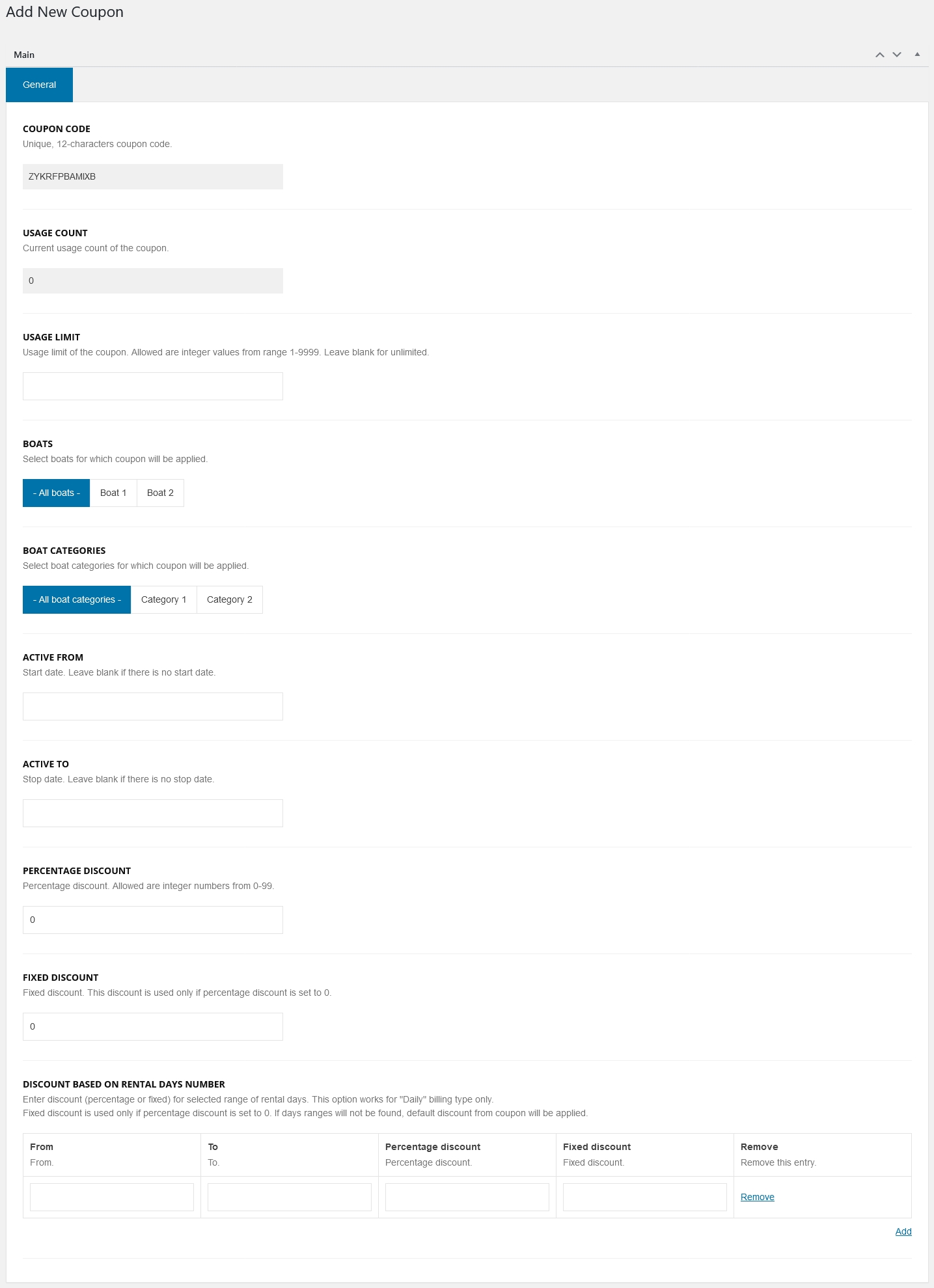
During adding/editing single coupon you can set following details:
-
In General tab you can define: usage limit, assign coupon to single boat and/or category, date of coupon activity, percentage/fixed discount.
Tax Rates
Tax Rates module allows to define tax rates used in system.
Edit Tax Rate
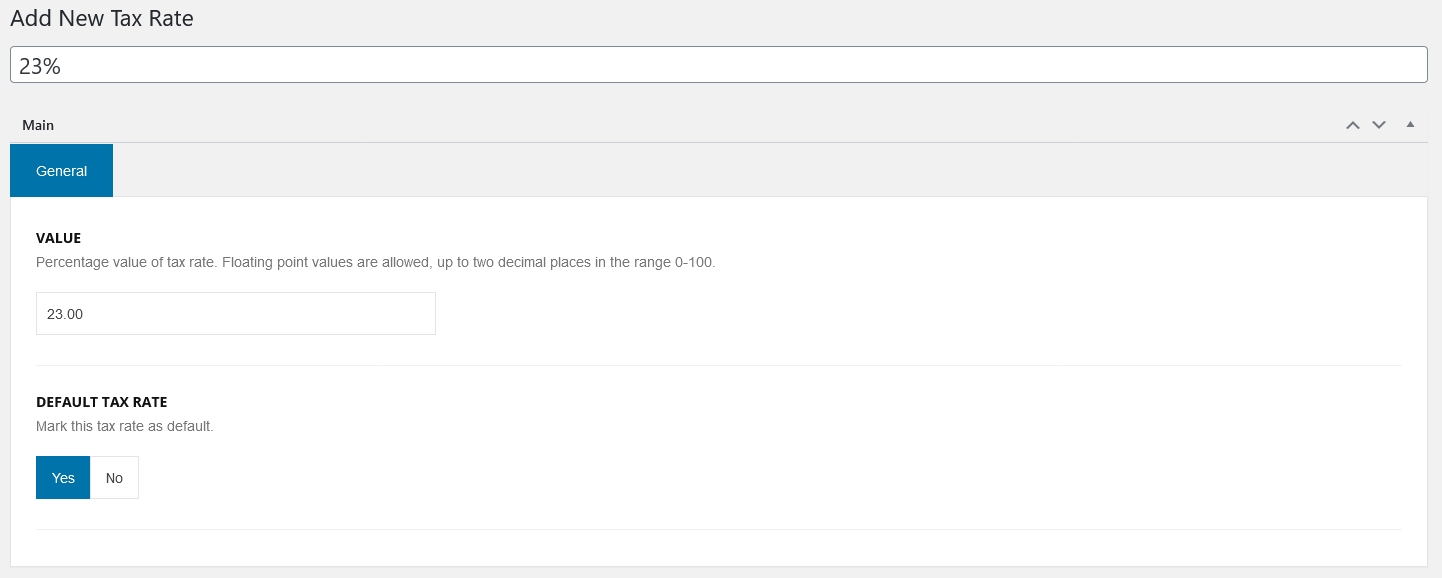
During adding/editing single tax rate you can set following details:
-
In General tab:
- Value - percentage value of tax rate. In this field allowed are floating numbers (with two digits after point) from range 0-100,
- Deafult tax rate - mark tax rate as default means, that tax will be default selected during adding items e.g: spaces, extras etc.
Email Accounts
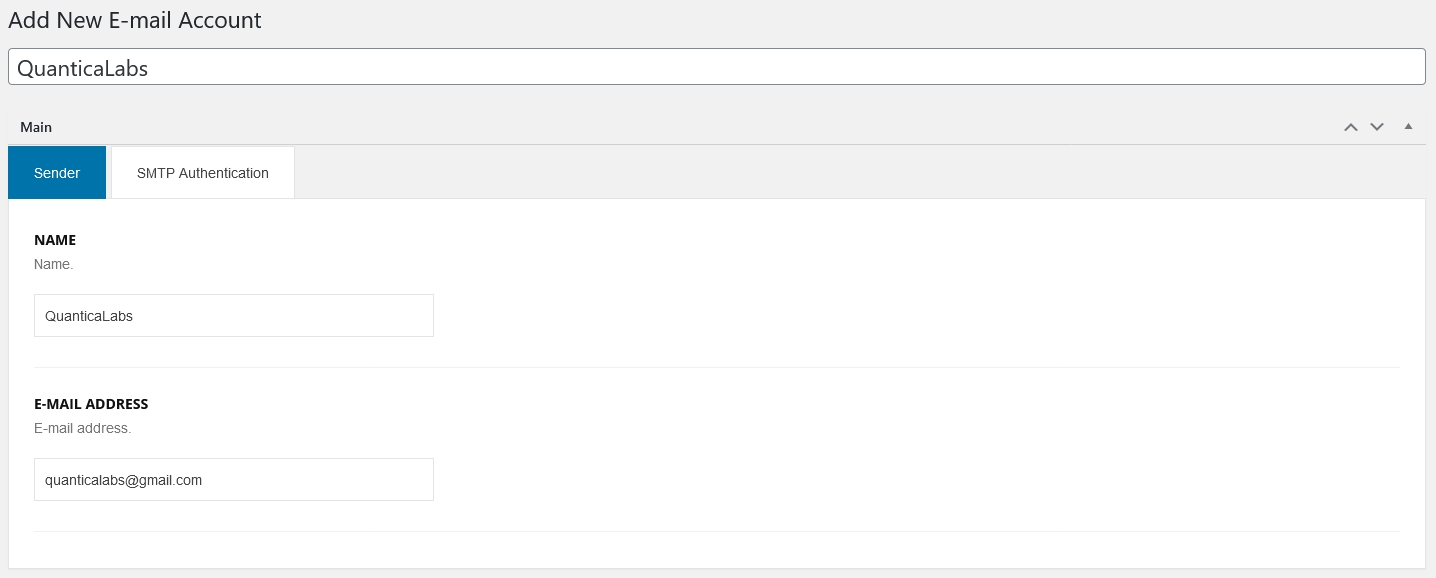
Email Accounts module allows to define e-mail accounts used in system to sending messages (e.g message to clients with booking details).
Edit Email Account
During adding/editing account you can set following details:
Plugin options
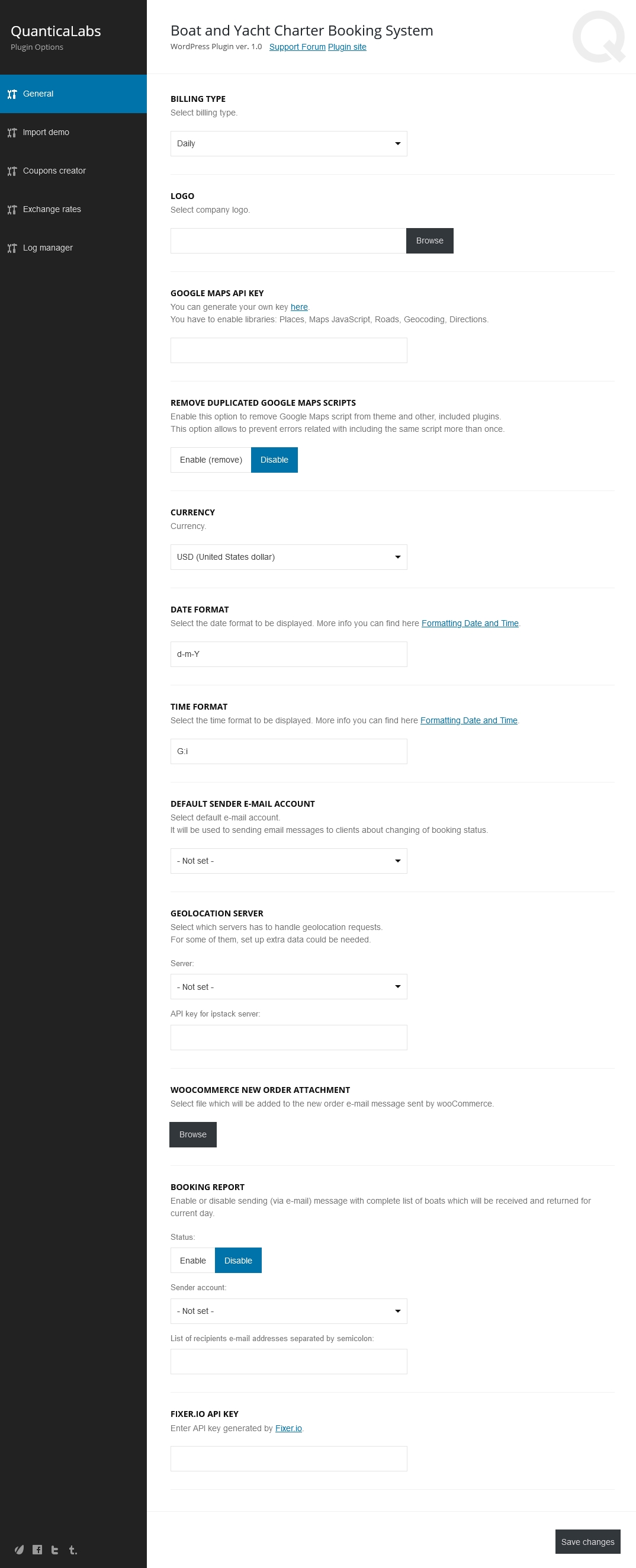
All global options of the plugin are available in Settings / Boat Charter Booking System.
This part of the plugin consists of tabs as below:
-
General - here you can set most important things like Google Maps API key,
company logo, base currency, time and date format etc.
- Import demo - more information you can find here Importing dummy content,
- Coupons creator - allows to create multiple coupons via one click,
- Exchange rates - allows to import and set manually exchange rates for all currencies used in the plugin,
- Log manager - includes debug information for such operations like: sending e-mail messages, sending short messages via Twiilo, Nexmo and Telegram, adding events to the Google Calendar.
Internationalization
The plugins comes with default .pot file located in languages folder.
To translate the theme, please follow the steps below:
- Download and install Poedit application.
- Download languages/boat-charter-booking-system.pot file.
- Open Poedit, click on File / New from POT/PO file text menu on the top, select downloaded .pot file.
- After opening file, you have to select language of translation.
- Translate all phrases to selected language.
- Click on File / Save, you will be promted about entering file name.
- You have to create file based on schema: boat-charter-booking-system-CODE.po, where list of code for each language is available here: https://wpastra.com/docs/complete-list-wordpress-locale-codes/.
- Upload files: .mo (newly created) and .po to server to the languages folder.
- Please note, that to use new translations, your WordPress site language (Settings / General / Site Language) should be the same as CODE (language) of .po file.
Files structure
| Path |
Description |
| class |
PHP classes |
| demo |
Files with demo content |
| font |
Fonts files |
| languages |
Language .po/.mo files |
| library |
PHP libraries used in theme. |
| media |
Image/audio files |
| multisite |
Dynamic created files |
| script |
Javascript libraries/plugins |
| style |
CSS files |
| template |
HTML/PHP templates |
| vc |
Visual composer components |
| woocommerce |
wooCommerce templates |
Credits
Fonts
This plugin uses fonts as below:
-
Jost,
Designed by Owen Earl, SIL Open Font License, 1.1, https://fonts.google.com/specimen/Jost,
-
Source Sans Pro,
Designed by Paul D. Hunt, SIL Open Font License, 1.1, https://fonts.google.com/specimen/Source+Sans+Pro,
-
Lato,
Designed by Łukasz Dziedzic, SIL Open Font License, 1.1, https://fonts.google.com/specimen/Lato.
Images
All images are used only for live preview purpose. They come from the free resources of the unsplash.com website and free online wallpapers repository including besthqwallpapers.com, wallpapercave.com, wall.alphacoders.com.
Version history
| Release date |
Version |
Description |
| 17.08.2022 |
1.5 |
Improved code,
Improved look and feel of dashboard options,
Added option to log errors from "Fixer.io" API,
Added option to set non-blocking booking statues,
Added option to set booking status if the booking sum is equal to 0.00.
|
| 19.11.2021 |
1.4 |
Improved code,
Added option to set deposit.
|
| 09.06.2021 |
1.3 |
Improved coding,
Added new options for PayPal,
Added option to set pre-defined booking status after successful payment,
Added option to synchronize booking statuses between plugin and wooCommerce and vice-versa,
Added option to display errors occurring during processing Stripe payments,
Added option to send test e-mail message.
|
| 15.12.2020 |
1.2 |
Added support for WP 5.6. |
| 05.12.2020 |
1.1 |
Improved code. |
| 01.12.2020 |
1.0 |
Initial release. |
Support
Support for all our items is conducted through our Support Forum.
Please register an account, search the forum or create a new topic, we'll answer as soon as possible.
We're in GMT +1 and we aim to answer all questions within 24 hours (Monday – Friday).
In some cases the waiting time can be extended to 48 hours.
Support requests sent during weekends or public holidays will be processed on next Monday or the next business day.
